Convert PDFs to editable Word documents
Recover editable content while understanding layout and OCR limitations.
 PDF Expert
 Adobe Acrobat Reader
 Scanner Pro
The short answer
Use conversion when you need to revise substantial content, but expect to inspect the resulting document. Text-based PDFs and scans require different handling; a successful DOCX export does not guarantee a clean, editable layout.
Which app fits your job?
PDF Expert
iPhone · iPad · macOSAnnotate and manage PDFs on Apple devices
Shortlist it for a document workspace with reading, markup and paid editing capabilities rather than one isolated conversion.
The tradeoff: Check the current plan for your target device; a review of the Mac version does not establish iPad feature access.
Free download · paid editing plans
Vendor website · EUR · 2026-10-18 · Plan details & source
Explore PDF Expert →Adobe Acrobat Reader
iPhone · iPad · macOSRead, comment and work within Adobe
Shortlist it when other people already exchange documents through Acrobat, or you need a familiar PDF reader with an upgrade path.
The tradeoff: Reader is not the same product entitlement as Acrobat Pro. Check which editing and conversion actions require payment.
Free reader · paid Premium offers
US App Store · USD · 2026-10-18 · Plan details & source
Explore Adobe Acrobat Reader →Scanner Pro
iPhone · iPadTurn paper into an organized document library
Look here when scanning, recognizing text and exporting documents are recurring work, not just an occasional camera capture.
The tradeoff: OCR and workflow features can depend on your purchase entitlement.
Free download · Plus pricing requires checkout
US App Store · USD · 2026-10-18 · Plan details & source
Explore Scanner Pro →
PDF Extractor
macOS · iPhone · iPadReuse PDF content on Mac, iPhone and iPad
Consider PDF Extractor 1.02 for focused content reuse rather than a full PDF editor. It describes local conversion and OCR with a one-time full-access purchase. Try a representative file before upgrading; our earlier version 1.01 iPhone image sample does not establish version 1.02 conversion quality or Mac behavior.
The tradeoff: Content recovery, not full PDF editing; check the saved conversion and keep the original. Earlier alpha-loss findings concern version 1.01 only.
Free limited use · one-time full-access purchase, no subscription
US listing · provider-described access · 2026-10-24 · Plan details & source
Explore PDF Extractor →Editorial selection advice based on the linked product documentation, attributed feedback and any explicitly labeled test results—not a universal winner.
See the apps, not just the feature list
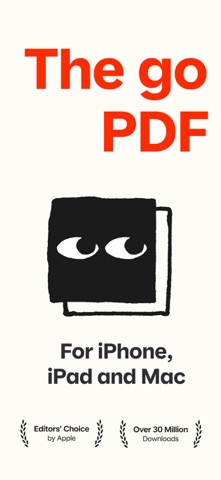
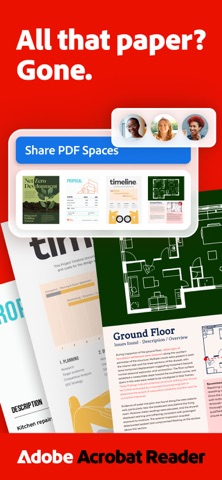
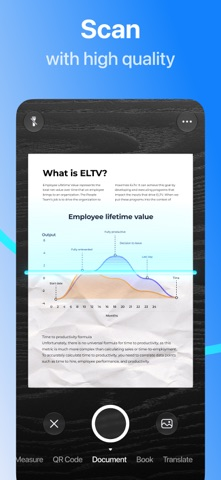
Developer-published product images. Captions identify the platform and source; these are not our test captures.
PDF Expert
Adobe Acrobat Reader
Scanner Pro
PDF Extractor
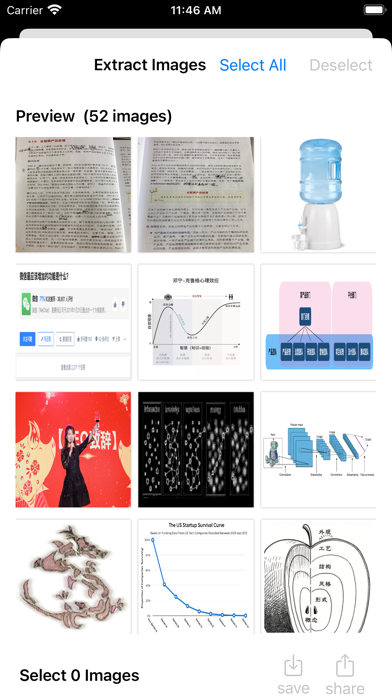
Historical version 1.01 image-extraction interface; not a version 1.02 conversion or Mac screenshot.
What reviewers and users say
Our summaries of linked accounts—not our own experience or a vote-based ranking. Older versions and different platforms are labeled. Sources reviewed October 18, 2026.
Apple App Store editorial
US listing editorial feature · publication date not supplied
Apple’s editorial feature emphasizes organizing, annotating and editing documents on iPad.
Read in context: Store editorial is distinct from an independent comparative benchmark or a customer review. The endorsement does not establish which features are free.
Macworld · Chris Barylick
May 24, 2022 · Mac Reader versus paid Acrobat editions
The reviewer distinguishes the free Reader from paid Acrobat tools and criticizes the upgrade-oriented experience when basic PDF work is the goal.
Read in context: Desktop and historical context, not a benchmark of the current iOS interface, mobile editing access or current subscription price.
App Store · kcezz
May 27, 2025 · US listing · version not stated
A student describes scanning homework for digital submission, valuing edge detection, adjustable cropping and correction of angled captures.
Read in context: One everyday scanning account, not a measured OCR-accuracy comparison or proof of the current free entitlement.
App Store · Ipad4me2
Jun 19, 2025 · historical workflow report
A long-time user reports lost automation workflows. Their later update says scan renaming and a newly created workflow work again, while the old workflows remain lost.
Read in context: Do not repeat the renaming failure as still unresolved. This is a user report, not our reproduction of the current app or proof that backups are currently unavailable.
Scanner Pro · App Store reader examples
US feed · 50 recent entries retrieved 2026-10-18. Up to one positive and one critical example selected from that feed; not a representative sentiment survey.
Pourmalla · 2026-10-16 · 4/5 · v9.0.2
“Dear Readdle Support Team, I have been using Scanner Pro…”Read the source feed ↗
Josie Sam · 2026-10-15 · 1/5 · v9.0.2
“After a major update, the app struggles to scan and…”Read the source feed ↗
No third-party evaluation of PDF Extractor’s exact image-extraction task is included in this selection. Our own sample is described separately from third-party accounts.
PDF Extractor · External coverage: We searched the exact product name and App Store ID on October 18, 2026. No suitable independent evaluation of this image-extraction workflow was located for this edition. Store facts and our small, separately labeled iPhone sample are available; this is a coverage gap, not evidence of broad approval or disapproval.
How to read disagreement
Different opinions can reflect different jobs, versions, devices or paid plans. We do not call a few comments “the consensus.” A consequential factual conflict that remains after checking those differences is a candidate for a focused hands-on test. A preference for one interface over another usually is not.
Compare your options
| Approach | Intended result | Tradeoff | Evidence boundary |
|---|---|---|---|
| PDF Expert conversion | Editable office document | Premium feature; fidelity unmeasured | Official plan listing |
| Acrobat export | Converted document | Paid entitlement and processing checks | Adobe subscription scope |
| Scanner Pro Word export | OCR-derived DOCX | Scan quality and paid boundary | Readdle export guide |
| PDF Extractor 1.02 | Editable Word (.docx) from PDF content on Mac, iPhone and iPad; provider describes on-device OCR for scans. | First 3 pages to try; full documents require a one-time purchase, no subscription. Reflow does not guarantee the original layout. | Current Apple metadata, checked Oct 24, 2026. Conversion quality not benchmarked against these alternatives. |
Inspect the source
Try selecting a sentence in the PDF. If the document is only a page image, recognition is needed before editable text can be produced. If you only need a short passage, copying verified text may be simpler than converting an entire document.
Multi-column layouts, tables, footnotes, equations and unusual fonts are useful stress cases. Choose a representative page and compare the exported result before committing to a long document or paid plan.
Match tool to document origin
Acrobat and PDF Expert publish paid conversion capabilities. Scanner Pro is another candidate when the source began as a scan and OCR is already part of the workflow. Do not assume that an export feature is included in the free tier.
The right output is not merely one that looks similar in a preview. Check whether headings, paragraphs and tables can actually be edited sensibly, whether text order is correct and whether important content became an uneditable image.
Review before sending
Open the DOCX in the recipient’s expected editor and compare critical facts with the original. Correct recognition errors manually. Retain the PDF as a reference and label the converted version clearly.
We have not yet run a shared conversion benchmark. Our current profiles establish candidate workflows from official documentation, not a ranking of accuracy. Cloud processing, local handling, account requirements and current regional entitlements remain operation-specific checks.
When PDF Extractor is another option
PDF Extractor 1.02 expands the candidate list beyond full PDF editors. Consider it when recovering editable content is the main job and you prefer a one-time purchase. Its current listing describes Mac, iPhone and iPad support, local processing and Word export, with the first three pages available to try.
Use a representative document before deciding. This is a source-based inclusion, not an accuracy ranking: we have not compared the candidates on the same Word-conversion test. Existing image-extraction observations do not establish how the new document converter handles tables or scanned text. The linked conversion guide and comparison explain the workflow and purchase distinctions.
Limitations & considerations
- PDF Expert: The vendor’s one-time €149.99 offer is Mac-only; it does not unlock iPhone/iPad editing. The €84.99 annual website offer covers the Apple-device plan.
- Adobe Acrobat Reader: Free Reader, mobile Premium and desktop Acrobat Pro are different entitlements.
- Scanner Pro: The public US in-app purchase list does not state the billing periods for several Plus amounts. Confirm the period and eligibility on the purchase sheet.
- PDF Extractor: The October 18 image evidence concerns PDF Extractor 1.01 on iPhone. Its returned transparency sample lost alpha. Version 1.02 has not been retested for this issue; do not claim it is fixed or unchanged.
Documented features, attributed opinions and explicitly labeled hands-on observations are different kinds of evidence. We do not infer unmeasured performance or privacy guarantees.
Sources & scope
Reviewed October 24, 2026. These are provider-published sources; listings and feature access can change. This article uses the linked documentation; any hands-on observations are separately labeled.
- PDF Expert plans
Annual and Mac-only lifetime offers are different entitlements; verify local purchase screen.
- Acrobat mobile subscription scope
Mobile-only plans are not equivalent to full desktop Acrobat subscriptions.
- Scanner Pro export guide
Documents export formats and watermark/Plus boundaries; requires purchase-screen confirmation.
- PDF Extractor 1.02 · live Apple metadata
Checked October 24, 2026; released October 23. Documents Word (.docx), Markdown, HTML and RTF conversion, local OCR, Mac/iPhone/iPad support and specific free allowances. Provider statements, not a new device benchmark.