Audio, video & subtitles
Buzz
An open-source desktop route to offline speech transcription and timed subtitle files.
Consider it when inspectable software and subtitle export matter more than a commercial transcript workspace.
Record, edit, transcribe, and caption audio and video.
 Ferrite Recording Studio
 iMovie
 LumaFusion
Find an approach for: convert audio and video formats.
Ferrite Recording StudioFind an approach for: edit podcast audio.
iMovieLumaFusionFind an approach for: edit a video on ipad.
Buzz MacWhisper
 TinyStudio
I need subtitles without uploading my video
Ferrite Recording StudioFind an approach for: record and organize voice notes.
BuzzMacWhisperI need an on-device interview transcript
 Promptia: Video Teleprompter
Choose a teleprompter with integrated recording when you must read and film on one iPhone.
 CarScreen: Video in Your Car
For one compatible video, try the existing player and AirPlay first.
An open-source desktop route to offline speech transcription and timed subtitle files.
Consider it when inspectable software and subtitle export matter more than a commercial transcript workspace.
A spoken-word recording and editing candidate for interviews, narration and podcasts on iPhone or iPad.
Shortlist it for podcast editing, reusable templates and keyboard-driven cleanup rather than music production.
Apple’s video editor is a baseline to try before buying a more complex editing workflow.
Start here for a simple movie project before paying for a more complex timeline editor.
A multitrack editor to investigate when an iPad project needs more deliberate control over layers and sound.
Consider it when a simple movie editor no longer fits your multitrack editing workflow.
A Mac transcription candidate with a broader workflow than a simple subtitle generator.
Shortlist it when you need transcript editing and exports as well as captions. Pick a local model when the intended workflow is on-device.
A Mac subtitle-generation candidate for creators who want to turn recorded speech into captions rather than edit a whole movie.
Shortlist it when the deliverable is a subtitle file rather than a multitrack video project. Read the model-setup instructions before getting started.
Read a script while preparing a timed video or speech.
Choose Promptia when you want timing estimates, script organization and optional voice-following in one teleprompter. Start with the free scripts for rehearsal; choose Pro specifically for unlimited voice follow or integrated recording. Look elsewhere if automatic iCloud script sync is essential.
Organize personal videos and choose a compatible external playback route.
Choose CarScreen when personal files and supported links need one library with playlists and external-screen options. For a single clip, try its existing player and AirPlay controls first. CarPlay itself is audio-only, and output compatibility depends on the source and receiver.
Apple
Apple's audio-recording app for capturing, organizing and editing voice recordings.
Utilities
Explore appSuperUltra, Inc.
A voice-to-text app for dictating text into other applications.
Productivity
Explore appSindre Sorhus
An audio-transcription app that uses Whisper models to turn speech recordings into text.
Productivity
Explore appBlackmagic Design Inc
A video post-production application for editing, color grading, visual effects and audio work.
Photo & Video
Explore appApple's iPad video editor for assembling footage, editing timelines and producing videos.
Photo & Video
Explore appOpen Planet Software
An audio-recording app with transcription and recording organization across supported Apple devices.
Utilities
Explore appDigital Workroom Ltd
A note-taking app that links written notes to moments in an audio recording.
Productivity
Explore appApple
Apple's music-creation app for recording audio, playing software instruments and arranging tracks.
Music
Explore appAn open-source audio editor and recorder for working with audio tracks and recordings.
Audio, video & subtitles
Explore appAn audio-production application designed for spoken-word editing, podcasting and radio workflows.
Audio, video & subtitles
Explore appAn open-source video transcoder for converting video files and adjusting encoding settings.
Audio, video & subtitles
Explore appA media-conversion tool for video, audio and image processing using FFmpeg.
Audio, video & subtitles
Explore appA macOS media-conversion interface for working with FFmpeg encoding and processing features.
Audio, video & subtitles
Explore appVideoLAN
An open-source media player for playing video, audio and network streams.
Photo & Video
Explore appNorton Five Ltd
A mobile teleprompter app for reading a script while recording a video.
Photo & Video
Explore appTeleprompter Apps Ltd
A teleprompter app for displaying scripts and controlling text scrolling during presentations or recordings.
Productivity
Explore appBIGVU INC
A video-creation service with a teleprompter, recording tools and captioning features.
Photo & Video
Explore appFirecore, LLC
A video player for browsing and playing media stored locally or on supported network and cloud sources.
Entertainment
Explore appPlex Inc.
A media service and player for organizing personal media libraries and accessing supported streaming content.
Entertainment
Explore app
Use iMovie first for a straightforward video with clips, titles and music. Consider LumaFusion when a particular layer arrangement, audio adjustment or interchange requirement justifies its extra controls and cost.
Buzz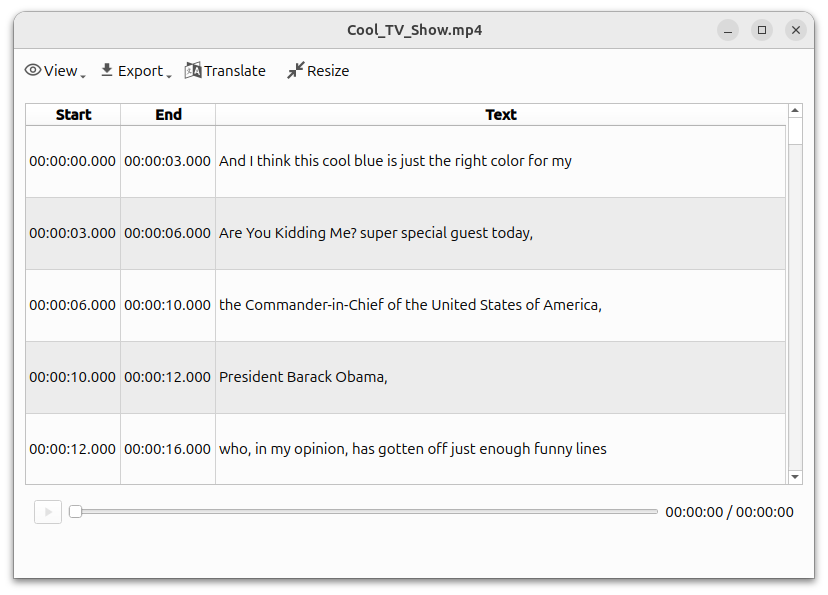 Step-by-step guide
Buzz is a free open-source candidate for local transcription on Mac. Download the required model before disconnecting and select a local backend, not a hosted API. Check hardware support: the current installation guide requires Apple silicon and identifies 1.4.5 as the last Intel-compatible release.
TinyStudioMacWhisperChoose TinyStudio for a focused Mac subtitle workflow. Choose MacWhisper when reviewing, reusing and exporting transcripts is a larger part of your work. TinyStudio’s Mac listing is free; MacWhisper offers Free and Pro editions. Neither positioning establishes an accuracy or speed winner.
LumaFusion Step-by-step guide
Start with three short clips, one title and a defined export target. Follow the linked LumaFusion reference guide for import, assembly and export, then check the finished movie outside the editor.
TinyStudio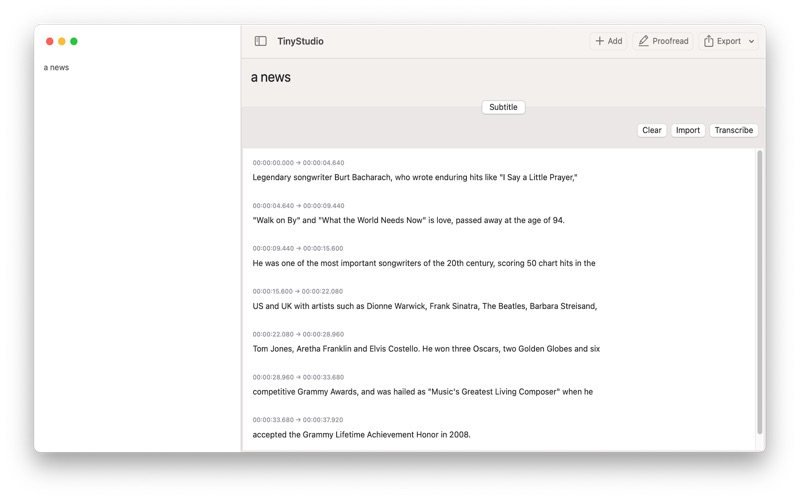 Step-by-step guide
Use this draft as a preparation and verification checklist for a TinyStudio subtitle run, not a claim that we have executed the latest app. The intended result is a corrected, timed subtitle file that plays with your video.
MacWhisper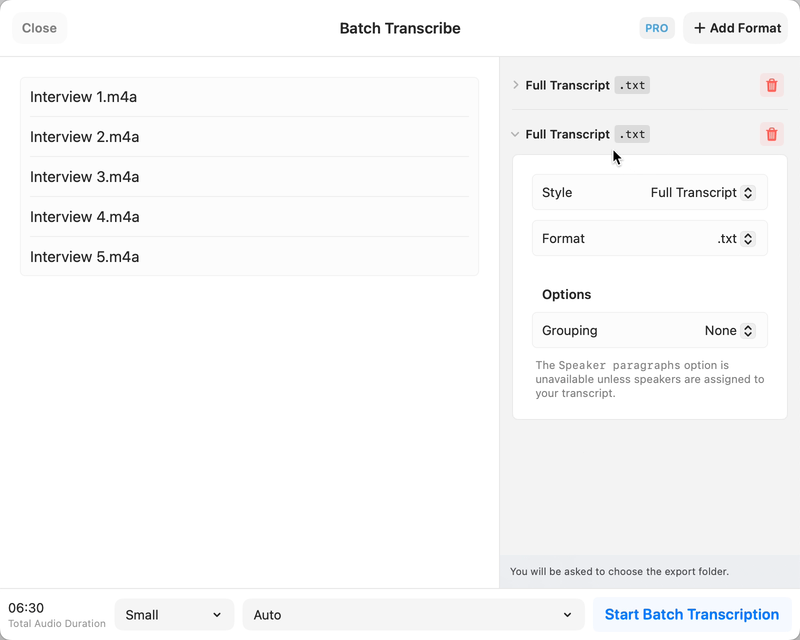 Step-by-step guide
Choose a local model for a local interview workflow, leave optional cloud actions disabled, and review names and speaker turns against the recording. MacWhisper’s official documentation describes the workflow; optional integrations are separate processing choices.